Copyright By FCA Italy S.p.A. - Printed 12/10/2017
Various models
all versions with BLUE & ME nav™ (Opt. 55Y) (500 - Grande Punto - Croma - Bravo - Ducato 250)
55
12.08
5570 1 481 R6
BLUE & ME nav™ SYSTEM (C3) Impossible to enable services / order control unit - Service Solution
Cancels and replaces SN 55.12.08 of 12/03/2008 for new fault code (R6 instead of RD)
CLAIMED FAULT
Impossible to activate services (Info Service, SOS, Insurance Services, etc.)
Impossible to order a new spare part through lack of consistency between model/chassis and blue&me nav™ control unit; (the words "No NIP code associated with the Model Chassis specified" appears on e-Plus)
OPERATIONS AT THE DEALERSHIPS
If the above problems are reported, carry out the Operating Cycle described below.
OPERATION CYCLE
Using the Examiner, determine the NIP and IMSI codes for the blue&me nav™ control unit, make a note of them and enter them into the e-Plus following the instructions in procedures 1 and 2 described below.
PROCEDURE 1 - DETERMINING NIP AND IMSI CODES
Using the Examiner, determine the NIP and IMSI codes for the Blue&Me Nav system (C3) as follows:
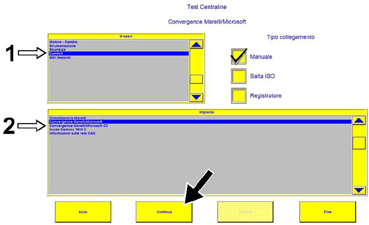
Connect using the EXAMINER in the Control Unit Test ambient, select the item Comfort in the Group menu (1 - Fig. 1) and then the item Convergence Marelli/Microsoft C3 in the System menu (2 - Fig. 1).
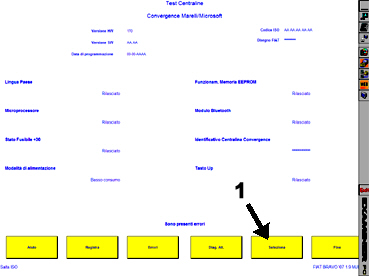
Press continue and the screen in Fig. 2 should appear
Fig. 1
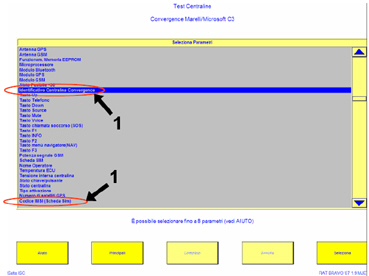
Press select (1 - Fig. 2) and the screen in Fig. 3 should appear
Fig. 2
Select the Convergence Control Unit and IMSI Code (SIM card) Identification parameters (1 - Fig. 3).
Fig. 3
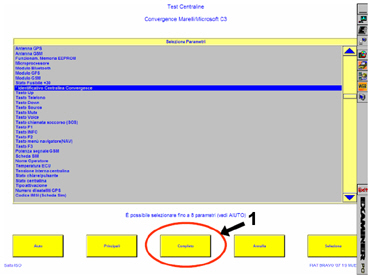
Then press the end button (1 - Fig. 4) and the screen in Fig. 5 should appear
Fig. 4
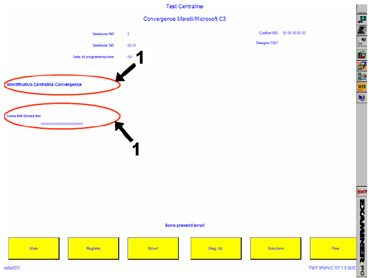
Check the codes and make a note of them (1 - Fig. 5).
Fig. 5
PROCEDURE 2 - LOADING NIP AND IMSI CODES ONTO E-PLUS
Connect to E-plus using your USER ID and PASSWORD and carry out the following operations:
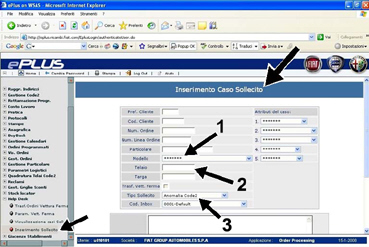
go to Help Desk - Enter reminder;
select the model (1 - Fig. 6);
key in the chassis number (2 - Fig. 6);
select the item Fault Code 2 in the Reminder Type field (3 - Fig. 6)
- enter the following data in the fault code 2 ticket note field: