Service News
Copyright By FCA Italy S.p.A. - Printed 21/05/2014 – Esc.1528


Ducato (250)


Version: all models with dusk sensor (Opt. 051)
50
03.14
5050 1 251 RA RAIN SENSOR/DUSK SENSOR
Light and/or windscreen wipers do not operate, with errors DTC error U1414 – Service Solution


CLAIMED FAULT

Immediately after the engine starting, the instrument panel displays "automatic headlight switching-on not available" and the lights and/or windscreen wiper do not operate automatically.

The check with the diagnosis equipment shows the presence of the following DTC error in the Body Computer:

U1414 – Rain - dusk sensor (RLS).

TECHNICAL CAUSE

Faulty software for the rain sensor/dusk sensor.

OPERATIONS IN PRODUCTION

Implementation of a new rain sensor/dusk sensor.

IMPLEMENTATION OF MODIFICATION


Version


Plant


Line


Chassis No.


Organisation No.


All models in question


Sevel


-


2577183


3509477

OPERATIONS AT THE DEALERSHIPS

DEALERSHIP BEHAVIOUR STANDARDS TOWARDS THE CUSTOMER

  • Once the Customer's claimed fault is confirmed, reassure the Customer that the fault will be solved by replacing the rain sensor/dusk sensor.
  • After the operation, show the Customer what has been done and make sure he is satisfied.

Service Solution

Once the customer's claimed fault is confirmed, replace the rain sensor/dusk sensor according to the Operating Cycle below.

OPERATION CYCLE

Perform the following operations sequentially:

  • Turn the ignition key to STOP and disconnect the battery negative terminal.
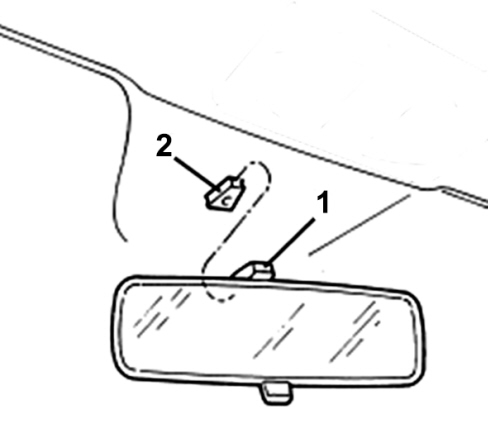
  • Raise the rear view mirror mounting (1 - Fig. 1), releasing it upwards from the retaining block (2) secure to the windscreen and remove the internal rear view mirror.

Fig. 1


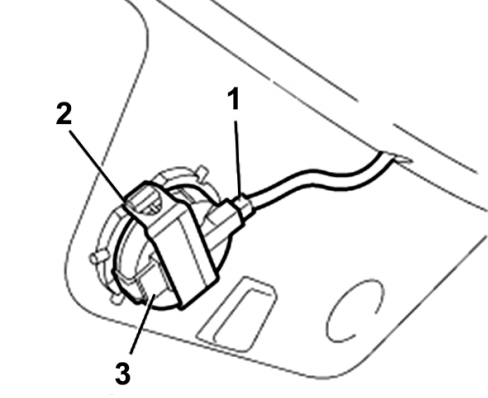
  • Disconnect the electrical connection for the rain sensor/dusk sensor (1 – Fig. 2).
  • Open the retaining clip (2) securing the sensor to its mounting on the windscreen glass.
  • Remove the rain sensor/dusk sensor (3).

Fig. 2


Take a new rain sensor/dusk sensor from the Spare Parts Dpt.

The protection film of the silicone layer on the side of the sensor, which touches the windscreen glass, must be removed only immediately before the assembly of the sensor. Avoid touching with your hands or other objects to prevent damage to the silicone.

  • Position the new rain sensor/dusk sensor (3 – Fig. 2) in its housing on the mounting of the windscreen glass.
  • Secure the sensor (3) with the retaining clip (2).
  • Connect the electrical connection (1).

Make sure that there are no air bubbles between windscreen glass and sensor.

  • Refit the internal rear view mirror securing the mounting (1 - Fig. 1) on the retaining block (2) fastened to the windscreen glass.
  • Check that the rear view mirror moves properly.

PARTS AVALABILITY


Version


Description


Part No.


Q.ty


All models in question


Dusk sensor/rain sensor


1382482080


1

CLAIM REPORT DATA


Version


Operation


Part


Fault


Position


Time allowance


All models in question


5050125


1


RA


-


0.20