





|
|






|
|
Service News
|
|
Copyright By FCA Italy S.p.A. - Printed 10/08/2007
|
|
|
Various Fiat Models
all versions with Blue & MeTM (Grande Punto, Nuova Bravo, Linea, Ducato X250)
|
|
|
|
|
5570 1 461 AC
|
BLUE & ME™ SYSTEM (C1)
Failed operation / milometer flashing - Service Solution
|
|
FAULT COMPLAINED OF
The customer complains of one or both of the following problems:
- milometer flashing;
- Blue & Me system operation stuck:
TECHNICAL CAUSE
Loss of data alignment between Blue & Me control unit and Body Computer.
OPERATIONS IN PRODUCTION
Adoption of new control units with updated software (release 71.28).
OPERATIONS IN NETWORK
Network behaviour standards towards the Customer
-
When this problem is reported and confirmed, reassure the Customer that it can be solved by reprogramming the Blue & Me system control unit.
-
After the operation show the Customer what has been done and make sure they are satisfied.
Service Solution
If this problem is reported, check the control unit software version and, if necessary, proceed with the update as described in the Operating Cycle below.
OPERATION CYCLE
Check whether updating is necessary
Check whether the software needs updating as follows:
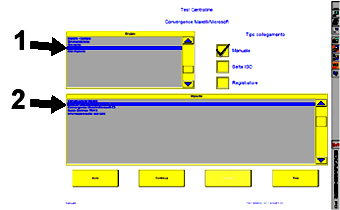
- Connect using the EXAMINER and, in the Control Unit Test ambient, select the item Comfort in the Group menu (1 - Fig. 1) and then the item Marelli/Microsoft Convergence in the System menu (2 - Fig. 1).
Fig. 1
- Check the control unit software version (1 - Fig. 2).
Fig. 2
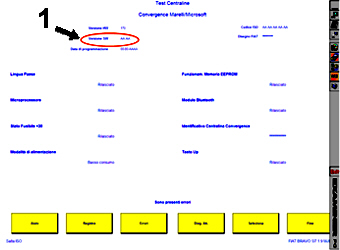
If the control unit software is one of the following 4 versions:
6135 - 6151 - 6278 - 6314.
Continue with the updating.
If the Software is NOT one of the above versions, there is no need to continue with the update.
Equipment required for control unit software updating
Before proceeding with updating the software, check that the following equipment is available:
- Personal Computer with Windows© 2000 / Windows© XP / Windows© VISTA.
- Internet connection to website.
- USB Pen with manufacturer's certification of compatibility with Windows© 2000 / Windows© XP / Windows© VISTA operating systems.
Software updating procedure
- To update the 6135 software version connect to the website:
http://aftersales.fiat.com/eLearn/blue/Aggiornamento%20C1V2_6135%20pw%20blue.zip
Download the C1V2_6135 pw blue.zip update file saving it in a folder on the PC.
- To update the 6151 software version connect to the website:
http://aftersales.fiat.com/eLearn/blue/Aggiornamento%20C1V2_6151%20pw%20blue.zip
Download the C1V2_6151 pw blue.zip update file saving it in a folder on the PC.
- To update the 6278 software version connect to the website:
http://aftersales.fiat.com/eLearn/blue/Aggiornamento%20C1V2_6278%20pw%20blue.zip
Download the C1V2_6278 pw blue.zip update file saving it in a folder on the PC.
- To update the 6314 software version connect to the website:
http://aftersales.fiat.com/eLearn/blue/Aggiornamento%20C1V2_6314%20pw%20blue.zip
Download the C1V2_6314 pw blue.zip update file saving it in a folder on the PC.
- Unzip the zip file using the blue password written in small letters.
- At the end of the unzipping process, depending on the software version, the files shown in figures 3 to 6 should be available:
Fig. 3 - For the 6135 version

Fig. 4 - For the 6151 version

Fig. 5 - For the 6278 version

Fig. 6 - For the 6314 version

- Delete any other files that may be on the USB pen.
- Copy the files as soon as they are unzipped onto the USB pen: place them in the main directory.
- Deactivate the pen using the Windows Menu (attention: this operation is vital to ensure the files are used properly).
- Get into the car.
- Turn the ignition key ON.
- Switch the radio on.
- Insert the USB pen in the connector.
- A series of messages will appear on the control panel indicating the progress of the operation as described in table 1 below.
- Remove the USB pen at the end of the operation
Table 1 - Messages in control panel display
|
Time |
USB pen |
Italian |
French |
English |
German |
Spanish |
|
0 |
Switching on |
-- |
-- |
-- |
-- |
-- |
|
5secs |
always on |
AGG. IN CORSO |
M.à J. EN COURS |
UPDATING |
AKT. LAEUFT... |
ACT. EN CURSO |
|
8secs |
always on |
RIAVVIO |
RECHARGEMENT |
RESTARTING |
NEUSTART... |
REINICIO |
|
17secs |
always on |
date / time |
date / time |
date / time |
date / time |
date / time |
|
1min 45secs |
always on |
INSTALLAZIONE |
INSTALLATION |
INSTALLING |
INSTALLATION |
INSTALACIÓN |
|
1min 47secs |
always on |
COMPLETATO |
COMPLETEE |
COMPLETE |
VOLLSTÄNDIG |
TERMINADA |
CLAIM REPORT DATA
|
all versions in question |
5570146 |
1 |
AC |
- |
0.20 |
|
