





|
|






|
|
Service News
|
|
Copyright By FCA Italy S.p.A. - Printed 28/01/2019
|
|
|
Various models
Versions: all models with CODE 2
|
|
|
|
|
5500 0 000 AA
|
CODE CARD – ELECTRONIC CODE
Instructions for electronic code request – Network Information
|
|

|
Cancels and replaces the following Service News:
• SN-Abarth models-55.06.11 of 28/10/2011.
• SN-Alfa models-55.10.11 of 28/10/2011.
• SN-Fiat models-55.002.16 of 22/09/2016.
• SN-Lancia models-55.012.11 of 28/10/2011.
• SN-various models-55.026.17 of 01/12/2017.
• SN-various models-55.026.17 of 18/07/2018.
|
APPLICABILITY
This SN may be applied to all cars with CODE 2 listed below.
Fiat
500 (150) - 600 (187) - Panda (169/319) - Punto (188) - Grande Punto/Punto Evo (199) - Idea (135) – Palio (178) - Linea (110) - Multipla (186) - 500L (330) - Stilo (192) - Bravo (198) - Tipo (356/357) - 500X (334) - Croma (194) - Sedici (189) - Ulysse (179) - 124 Spider (348) - Strada (278) - Qubo (300) - Doblò Panorama (119 / 152) - Fullback (305)
Alfa
147 / 147 Ducati Corse (190) - 156 (116) - 159 (140) - 166 (136) - Brera / Spider (177) - Mito (145) - Giulietta (191) - Giulia (620) - Stelvio (630) - 4C (643)
Lancia
Ypsilon (101 / 402) - Musa (184) - Lybra (109) - Thesis (115) - Delta (181) - Phedra (180)
Abarth
Grande Punto / Punto Evo (199) – 500 / 695 Tributo Ferrari / 695 Edizione Maserati / 695 Biposto (150) - 124 Spider (348)
Professional
Panda Van (271/519) - Grande Punto Van/Punto Evo Van (299) - Idea (235) – 500L Van (530) - Bravo Van (298) - Croma Van (294) - Fiorino (225) - Doblò Combi/Cargo (223 / 263) - Strada (278) - Scudo (272) - Fullback (502/503) - Talento (296) - Ducato (250) - Ducato FL (290/295)
RAM
RAM 1200 (504)
General information
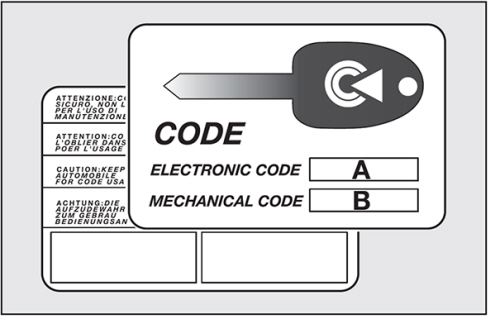
We hereby inform you that starting from 2012, initially for the Panda (319) model, and subsequently for the new models, there is no longer a Code Card (Fig. 1) on all models equipped with the CODE 2 system.
Fig. 1 – Code Card
The following specifies which models are equipped with the Code Card and for which models the electronic code can be requested through the CSPS system.
Cars initially supplied WITH Code Card
-
On all cars listed in the "Applicability" section EXCEPT Panda / Panda Van (model 319 / 519 with chassis number after 3078500), 500L / 500L Van, 500X, Tipo (356/357), Giulia, Stelvio, 4C, Fiat / Abarth 124 Spider, Fullback, Talento, Ducato FL (290/295 starting from chassis no. 02K02219) and Ypsilon (402), the Code Card is consigned together with the vehicle documents.
-
If necessary (e.g. if the Code Card is mislaid), the electronic code can be requested using the CSPS system (refer to the "Entering electronic/mechanical code request order" section below).
-
If the Customer wishes to purchase a Code Card, it can be requested using the CSPS system (refer to the "Entering Code Card purchase order" section below).
Cars initially supplied WITHOUT Code Card
-
The cars Panda / Panda Van (model 319/519 from chassis 3078500), 500L / 500L Van, 500X, Tipo (356/357), Giulia, Stelvio, 4C, Fiat / Abarth 124 Spider, Fullback, Talento, Ducato FL (290/295 starting from chassis no. 02K02219) and Ypsilon (402) do NOT have a Code Card.
-
To increase the security level of the 500X, Tipo (356/357), Giulia, Stelvio, Fiat / Abarth 124 Spider, Fullback and Talento, the electronic code is no longer supplied through the CSPS system, but it is calculated by the diagnosis tool (wiTechPlus – wiTech 2.0). If necessary (e.g. for coding a new key, Body Computer replacement, etc.), the diagnosis tool recognizes the vehicle data and automatically calculates the electronic code, which therefore does not need to be typed in.
|
|
The diagnosis tool must be kept connected to the vehicle and to Internet until the end of the procedure.
|
-
For Panda / Panda Van from chassis 3078500, 500L / 500L Van, 4C, Ducato from chassis no. 02K02219 and Ypsilon (402), the electronic code can be requested using the CSPS system, and Customers wishing to do so can purchase a Code Card (see points below).
ELECTRONIC CODE REQUEST THROUGH CSPS
The electronic code can be requested by CSPS for all the cars listed in the "Applicability" section EXCEPT 500X, Tipo (356/357), Giulia, Stelvio, Fiat / Abarth 124 Spider, Fullback and Talento.
Check on rightful ownership
To protect the Customer’s safety and that of the vehicles of the Group, if the electronic code is requested Dealers must establish the customer’s identity and ownership of the car, requesting the following:
-
an identification document proving ownership of the car (registration document or ownership certificate)
-
a valid identity document belonging to the customer
A copy of such documents must be filed progressively (with yearly numbering) and be kept available for any subsequent investigations for 5 years from the date of the order.
Entering an Electronic / Mechanical code request order
With effect from 04/12/2017 electronic and mechanical key code requests will use new procedures: there will be no charge for the code request procedure described in the following section and a charge will only be made if the Customer wishes to purchase a physical Code Card containing the electronic and mechanical key codes. The Code Card request procedures are described in the "Entering Code Card purchase order" section.
|
|
For the 124 Spider and Fullback models, this request will not give the electronic code, but the mechanical one (engraved code) for ordering an engraved key with a Code 1 order.
|
-
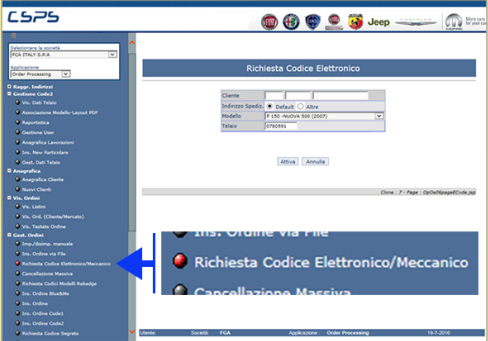
Select Order Management, followed by Electronic/Mechanical Code Request (Fig. 2).
Fig. 2
-
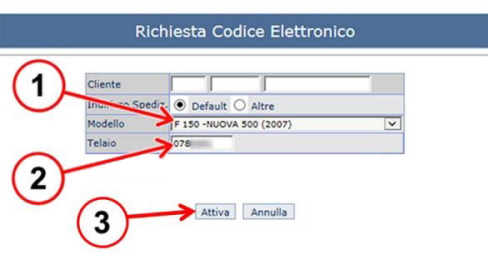
Enter the model (1 - Fig. 3) and chassis number (2) of the vehicle for which the code is required.
-
Clicking “Activate” (3) will display the screen in figure 4.
Fig. 3
-
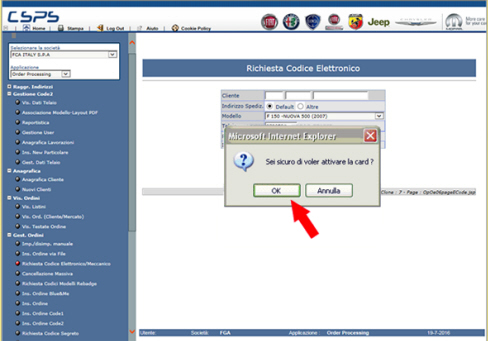
If the data entered is correct, click the "OK" button (Fig. 4) and move on to the screen in fig. 6.
-
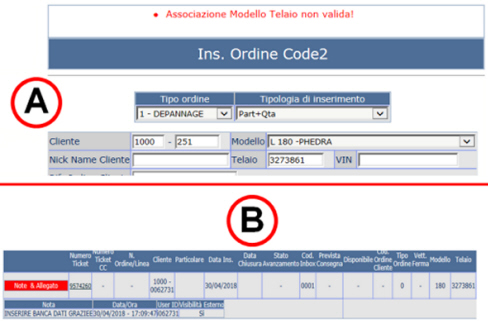
Screen A in figure 5 will be displayed if the information is not available.
Fig. 4
-
Screen A in Fig. 5 is displayed if the Dealer tries to enter an order on CSPS to request the electronic code (or that of another coded product, such as keys, engraved code, Body Computer, etc.), but the CSPS database does not contain the required information.
-
In this case, the Dealer must open a ticket "code 2 fault" on CSPS as shown in example B in Fig. 5.
|
|
The above applies for all coded products.
|
Fig. 5
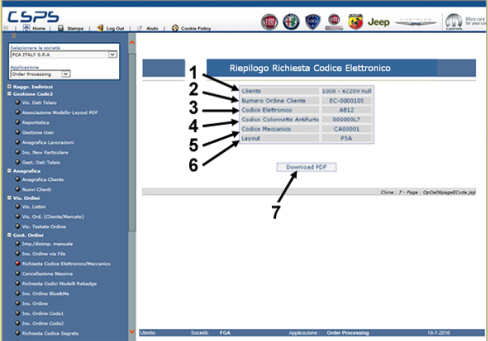
The following information will be displayed (Fig. 6):
-
Market - Requesting Dealer Sincom (1).
-
The order number (2) generated on-line which will have the format EC+ 7 numbers. This order number will be used for invoicing and for displaying and tracking the order line on “show orders”, entering it in the “customer order code”.
-
Electronic code (3).
-
Anti-theft code and Mechanical code (4 and 5) - the fields will only be managed for models produced by PSA (179/new Ulysse, 180/Phedra, 272/new Scudo).
-
Layout (6) (MOPAR or PSA).
Clicking "Download PDF" (7 - Fig. 6) will display the screen in fig. 7.
Fig. 6
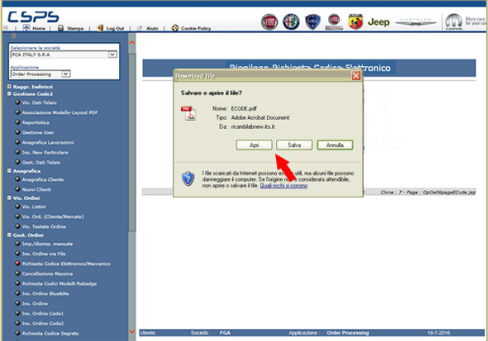
In this screen (Fig. 7) you can open the file directly or save it to your PC to open it later (Adobe Acrobat Reader is needed).
Fig. 7
The pdf file will have a MOPAR or PSA layout as shown in fig. 8.
|
|
The pdf file will only be displayed; there is no need to consign it to the Customer.
|
Fig. 8
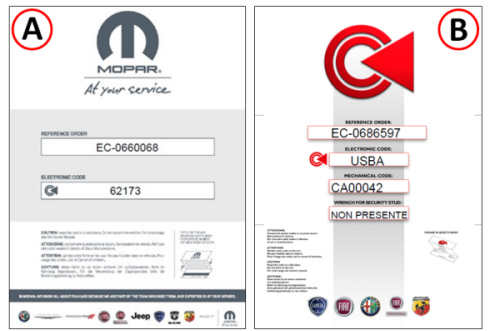
A. MOPAR layout
B. PSA vehicle layout
Entering a Code Card purchase request order
-
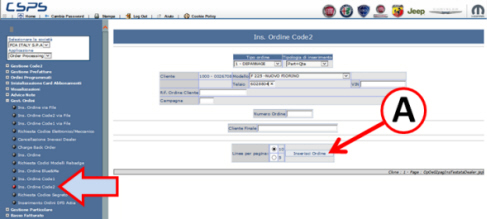
Select Order Management, followed by Enter Code 2 Order (Fig. 9).
-
Enter the chassis number and car model or VIN and any order reference, then click Enter Order (A – Fig. 9); the screen in Fig. 10 will appear.
Fig. 9
-
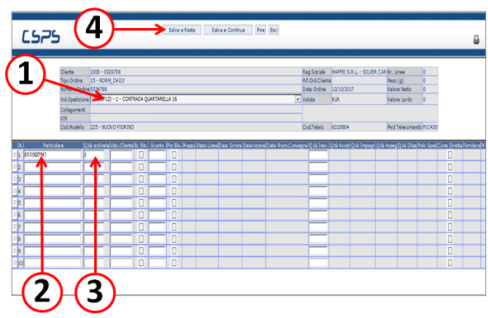
Select the delivery address (1 – Fig. 10).
-
Enter the part number (2) (*).
-
Enter the quantity (3).
-
Clicking Save and Remain (4) will display the screen in figure 11.
(*) The relevant part numbers are:
MOPAR - PN 6000627947 (for Fiat, Abarth, Fiat Professional and Lancia vehicles)
Alfa Romeo - PN 6000627948 (for Alfa Romeo vehicles)
Fig. 10
-
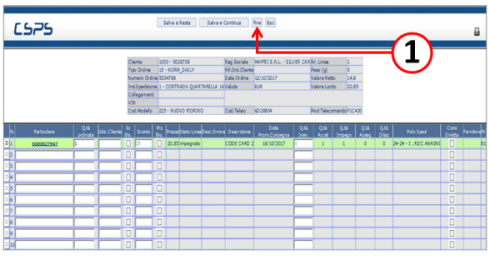
The order will be entered as shown in Fig. 11 and will be dispatched as quickly as possible in accordance with the standard spare parts order procedure.
-
Click End (1 – Fig. 11).
Fig. 11
Code Card billing information
The dealer will receive a specific invoice, within the standard invoicing period, containing the drawing number and the order number.
Order display
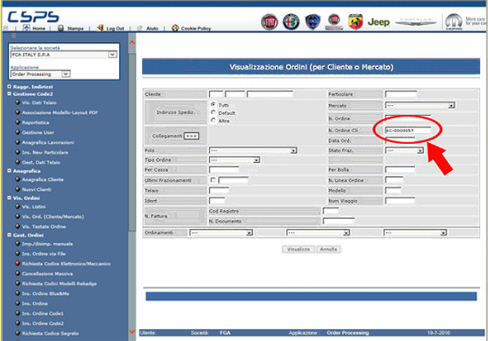
To display a specific order, enter the order number displayed in the request output (EC-nnnnnnn - 7 numbers) in the "Customer order number" field as shown in fig. 12.
Fig. 12
|